

Use cases
You can use artifacts throughout your entire ML workflow as inputs and outputs of runs. You can use datasets, models, or even other artifacts as inputs for processing.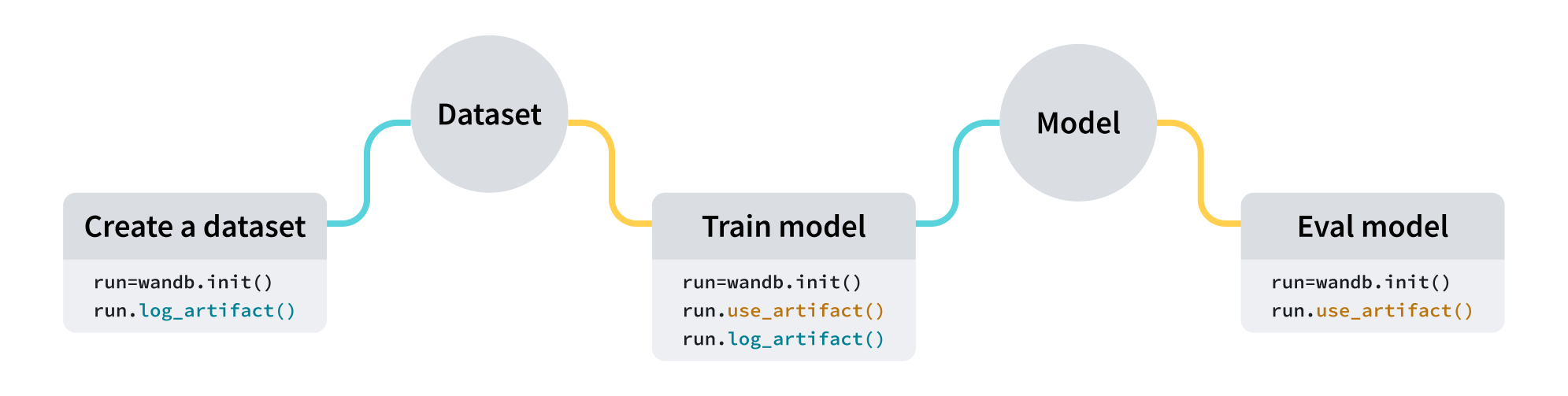
The following code snippets are meant to be run in order.
Create an artifact
Create an artifact with four lines of code:- Create a W&B run.
- Create an artifact object with
wandb.Artifact. - Add one or more files, such as a model file or dataset, to the artifact object with
wandb.Artifact.add_file(). - Log your artifact to W&B with
wandb.Run.log_artifact().
dataset.h5 to an artifact called example_artifact:
- The
typeof the artifact affects how it appears in the W&B platform. If you do not specify atype, it defaults tounspecified. - Each label of the dropdown represents a different
typeparameter value. In the above code snippet, the artifact’stypeisdataset.
See the track external files page for information on how to add references to files or directories stored in external object storage, like an Amazon S3 bucket.
Download an artifact
Indicate the artifact you want to mark as input to your run with thewandb.Run.use_artifact() method.
Continuing from the previous code snippet, the following code example shows how to use the artifact called example_artifact that was created earlier:
You can pass a custom path into the
root parameter to download an artifact to a specific directory. For alternate ways to download artifacts and to see additional parameters, see the guide on downloading and using artifacts.Usage limits
The following table lists usage limits for Artifacts and W&B Registry. These limits are shown together because Artifacts and Registry share related resources and workflows.
An artifact sequence is a specific, versioned artifact in a project. For example, if you log an artifact named
model, W&B creates a sequence called model. Each time you log a new version of that artifact, W&B creates a new version in the sequence: model:v0, model:v1, and model:v2.
Contact W&B Support if you have questions about limits.
Next steps
- Learn how to version and update artifacts.
- Learn how to trigger downstream workflows or notify a Slack channel in response to changes to your artifacts with automations.
- Learn about the registry, a space that houses trained models.
- Explore the Python SDK and CLI reference guides.